Nutrition Fact vs. Fiction: What Nutrition Labels Tell You—And Food Scanner Apps Don’t
Publish Date: January 29, 2026
Last Update: February 2, 2026
Thrive Market’s content is produced by skilled writers, fact-checked by experts, and updated regularly. This article was reviewed and edited by:
Sabrina Wildermuth, MS, Certified Food Scientist (CFS) and Director of Nutrition & Regulatory Compliance and Michelle Leonetti, MS, Registered Dietitian Nutritionist (RDN) and Quality Assurance Nutrition & Regulatory Manager.
If grocery shopping ever feels confusing, you’re not alone. Between overblown health claims, long ingredient lists, and now even food scanner app scores, it can be hard to tell what actually matters. That’s where the Nutrition Facts label comes in.
Nutrition labels are tools to help create clarity and consistency across food products. They’re designed to help you compare foods, understand what’s inside, and make choices that support your goals, preferences, and lifestyle. In this guide, we’re breaking down nutrition facts and explaining how to read nutrition labels with confidence—and sharing why food scanner apps don’t always tell the full story.
What is a Nutrition Facts Label?
The Nutrition Facts label is maintained by the U.S. Food and Drug Administration (FDA) to give shoppers standardized, consistent information across packaged foods. That consistency is key: It allows you to compare similar products side by side, without marketing claims getting in the way.
Want to learn more about how to read a nutrition label? Here are the major areas of interest (and how to make sense of each one).
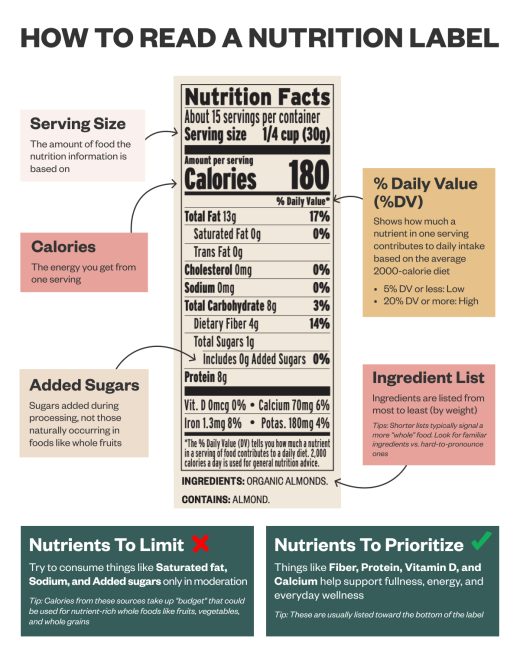
1. Serving Size
The serving size tells you how much food the nutrition information is based on. Every number on the label—calories, nutrients, % Daily Value—refers to this amount.
That doesn’t mean it’s a recommendation, though; all bodies have different needs, so this is simply a reference point. If you eat more (or less) than the listed serving size, the nutrition information changes, too. Comparing serving sizes between similar products can also reveal meaningful differences.
2. Calories
Calories represent energy, or more specifically, how much energy a food provides when your body breaks it down.
That energy is what your body uses to keep moving and grooving, including maintaining digestion, body temperature, and powering your brain, lungs, and heart.
Two foods with the same calorie count can look very different when you factor in fiber, protein, fats, and micronutrients. While calories measure energy, they don’t describe how that energy is delivered.
For example:
- Foods with fiber and protein tend to release energy more slowly and support fullness
- Foods higher in refined sugars may deliver energy quickly, but without the same staying power
Rather than focusing on a single number of calories, it can be useful to ask: Which nutrients am I getting alongside these calories?
3. Percent Daily Value (%DV)
The % Daily Value (%DV) shows how much a nutrient in one serving contributes to a general daily intake.
A simple guideline many people use:
- 5% DV or less = lower amount
- 20% DV or more = higher amount
This makes %DV especially helpful for comparing similar products, like two snack bars or two frozen meals. It’s not meant to be a personal target or something you need to “hit” exactly each day.
4. Nutrients (To Limit & To Prioritize)
When nutrition labels group nutrients, they’re not doing it randomly. The order and emphasis on the label are based on longstanding public health guidance about how different nutrients tend to affect overall health when consumed regularly.
Why Some Nutrients Appear at the Top
On a Nutrition Facts label, you’ll usually see these listed near the top:
- Saturated fat
- Cholesterol
- Sodium
That’s because these nutrients are widely recommended to be consumed in moderation across many dietary patterns. The label highlights them so they’re easy to spot and compare between products.
Why Other Nutrients Appear Lower
Lower on the label, you’ll often see:
- Fiber
- Protein
- Vitamin D
- Calcium
- Iron
- Potassium
These are nutrients many people don’t consistently get enough of, or that play important roles in supporting everyday functions like digestion, muscle maintenance, and bone health. They’re grouped together so people can easily identify them and seek them out in foods.
5. Added Sugars vs. Naturally Occurring Sugars
One of the most helpful updates to nutrition labels is the inclusion of added sugars. This line shows sugars added during processing—separate from sugars that naturally occur in foods like whole fruit or milk.
Foods that contain naturally occurring sugars often also contain fiber, protein, or other nutrients. Added sugars also provide sweetness but without those same benefits, making this line especially useful when comparing packaged foods.
6. The Ingredient List
The ingredient list complements the Nutrition Facts panel by showing what the product is actually made of.
A few helpful tips:
- Ingredients are listed from most to least (by weight)
- Shorter lists usually denote less processed foods
- When in doubt, look for familiar ingredients
- Multiple names for sugar may signal added sweeteners
Ingredient transparency helps you make informed choices, especially if you’re navigating food allergies, dietary restrictions, or other lifestyle factors.
What Nutrition Labels Don’t Show
Nutrition labels are powerful tools, but they don’t paint the full picture. Understanding what isn’t included can help you use labels more thoughtfully and with less stress.
They don’t capture food quality or sourcing. A Nutrition Facts label shows nutrients, not how ingredients were grown, sourced, or processed. It won’t tell you whether a food is sustainable, responsibly sourced, or made with ingredients you personally prioritize. That context matters, especially if you’re dedicated only to supporting ethical supply chains or shopping for organic groceries.
They don’t show how foods work together. Nutrition labels break foods down into individual nutrients, but they aren’t able to take into account the other foods you’re eating. How foods are combined—like pairing carbohydrates with protein or fiber—can influence satisfaction, energy, and how a meal fits into your day.
They aren’t personalized. Nutrition labels are standardized by design. They don’t know your activity level, height and weight, health concerns, or what else you’ve eaten that day. That’s why the same food can serve different purposes for different people.
They don’t measure enjoyment or convenience. A food you enjoy and can easily prepare is more likely to support consistent, balanced eating than one chosen solely by the numbers.
What are Food Scanner Apps?
Food scanner apps are designed to make grocery shopping feel faster and more approachable. By scanning a barcode or searching for a product, these apps typically analyze the Nutrition Facts label and ingredient list, then summarize that information into a score, rating, or color-coded system.
The goal is simplicity: Instead of reading the full label, shoppers get a quick snapshot meant to help them compare foods at a glance.
How Food Scanner Apps Work
While features vary by app, most food scanner tools:
- Pull data from the Nutrition Facts label and ingredient list
- Weigh certain nutrients more heavily than others
- Use algorithms to assign scores or categories (often deciding if a food is “healthy” or “unhealthy”)
- Translate detailed nutrition information into a simplified rating
Some apps may prioritize nutrients like added sugars or sodium, while others focus more on ingredient lists or specific dietary patterns. Because each app uses its own formula, the same food can receive very different scores depending on which app you use.
Why the Nutrition Facts Label Still Matters
Food scanner apps can be useful starting points—especially for people who are new to healthy eating. They can highlight nutrients people may want to monitor and make comparing foods feel easier.
The Nutrition Facts label, however, shows the actual numbers behind the score—serving size, fiber, protein, added sugars, and more—without translating them into a single judgment. Understanding how to read the label yourself gives you flexibility and allows you to decide which nutrients matter most to you and how a food fits into your day, rather than relying on a one-size-fits-all score.
How Thrive Market’s Barcode Scanner is Different
Did you know that we have a barcode scanner on the Thrive Market app? Unlike other food scanner apps, ours doesn’t pass judgments on foods you may be considering; instead, it helps you find alternatives to the foods you’ve already decided aren’t for you.
Here’s how it works:
- In the Thrive Market app, tap the search bar at the top of the screen.
- In the right hand corner, tap on the barcode icon.
- Use the camera to scan the barcode of any pantry or household item.
- The app will suggest organic and non-GMO alternatives at Thrive Market.
- Add the items to your Thrive Market cart and have them shipped to your door.
Read more about nutrition:
What are Omega-3 Fatty Acids? Benefits, Food Sources, Supplements, and More
Share this article

Amy Roberts
Amy Roberts is Thrive Market's Senior Editorial Writer. She is based in Los Angeles via Pittsburgh, PA.